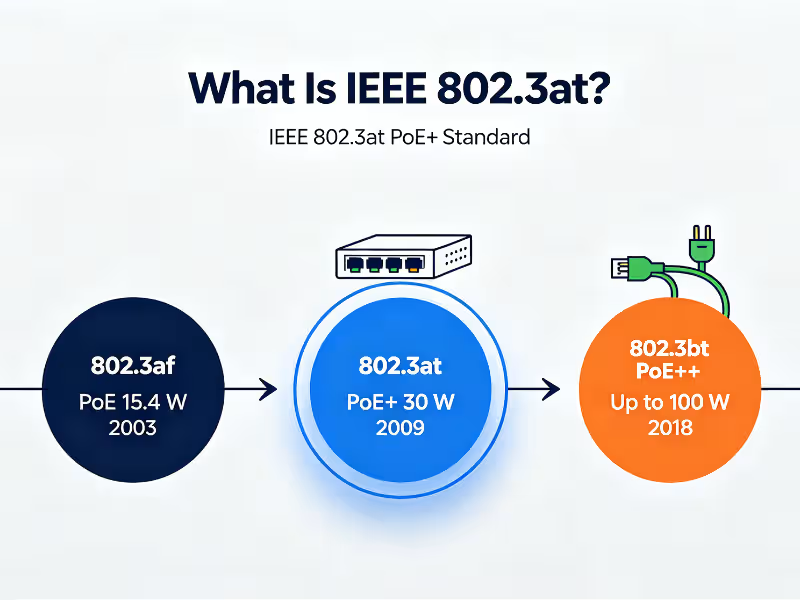
IEEE 802.3at is the Power over Ethernet standard most people know as PoE+. It lets a switch or injector send up to 30 W per port over standard twisted-pair Ethernet cable and guarantees 25.5 W at the device on the other end. Power and data share the same cable, so one run does the work of two.
The IEEE ratified 802.3at in 2009 as an amendment to IEEE 802.3. The reason was practical. The original 802.3af standard topped out at 15.4 W. That was not enough for pan-tilt-zoom cameras, dual-radio access points, or video phones. The PoE+ standard roughly doubled the available power and made those devices viable on a single cable.
This guide covers what IEEE 802.3at defines, how power negotiation works, the exact 802.3at power specifications, compatibility rules, and what to check before you deploy. For a broader view across all three generations, see our comparison of IEEE 802.3af, 802.3at, and 802.3bt.
What Is IEEE 802.3at (PoE+)?
IEEE 802.3at defines Type 2 PoE. It sets the rules for how much power a port can deliver, how a switch decides whether a device should receive power, and how both ends agree on the amount. Type 1 refers to the older 802.3af power level, which 802.3at still fully supports.
The naming causes more confusion than the technology. 802.3at, PoE+, PoE Plus, and Type 2 PoE all describe the same thing. If a datasheet uses any of these terms, it refers to the 30 W tier.
Every PoE+ link has two roles:
- PSE (Power Sourcing Equipment): The device that supplies power. This is usually a PoE+ switch (an endpoint PSE) or an injector placed between a non-PoE switch and the device (a midspan PSE).
- PD (Powered Device): The device that receives power, such as an IP camera, wireless access point, VoIP phone, or access control reader.
One detail matters to anyone reading standards documents. 802.3at no longer exists as a separate standard. Its contents were merged into the base IEEE 802.3 standard starting with IEEE 802.3-2012, and they now sit in Clause 33. Manufacturers still print “802.3at” on spec sheets because buyers search for that term, and it remains the clearest way to name the power tier.
How Does the IEEE 802.3at PoE+ Standard Work?
A PoE+ switch never pushes power down a cable blindly. It runs a short handshake first. The switch confirms that a real PoE device is connected, asks how much power it needs, and only then applies full voltage. This handshake is why you can plug a laptop into a PoE+ port without damaging it.
The process runs in five stages:
- Detection. The PSE applies a low probe voltage (2.7–10.1 V) and looks for a signature resistance of about 25 kΩ, within an accepted window of roughly 19–26.5 kΩ. A laptop NIC or a printer does not present this signature, so the port stays unpowered.
- Physical-layer classification. The PSE raises the voltage into the classification range and measures the current the PD draws. 802.3at added two-event classification. The PSE runs this step twice, and a Type 2 PD answers as Class 4 both times. This is how the switch knows the device is PoE+ rather than standard PoE, before any data is exchanged.
- Power-up. The PSE applies operating voltage (50–57 V) while limiting the initial inrush current, so the PD’s input capacitors charge safely.
- Data-link-layer classification (LLDP). Once the link is up, the PD can use LLDP (Link Layer Discovery Protocol) to request power in 0.1 W steps. An access point that needs 19 W can ask for exactly 19 W instead of taking the full Class 4 reservation. This is the most underused feature of 802.3at, and it directly affects how many devices one switch can power.
- Monitoring and disconnect. The PD must keep drawing a minimum current, called the Maintain Power Signature. When someone unplugs the device, that current disappears, and the PSE removes power within a few hundred milliseconds. A newly connected device always starts again from detection.
A practical scenario: A switch powers 16 access points. With physical-layer classification only, the switch reserves 30 W for each one, or 480 W in total. With LLDP enabled, each AP requests its real draw of about 18 W, and the reservation falls to 288 W. Same switch, same devices, roughly 190 W of budget freed for cameras. If your switch supports LLDP-MED power negotiation, turn it on.
802.3at delivers power over two of the four pairs in the cable. Alternative A sends power over the data pairs (pins 1/2 and 3/6). Alternative B uses the spare pairs (pins 4/5 and 7/8). The PSE chooses the method, and every compliant PD must accept power on either set, in either polarity. Installers rarely need to know which alternative a switch uses, but it helps explain why some proprietary “4-pair PoE+” products from before 802.3bt don’t behave like standard PoE+.
IEEE 802.3at Power Specifications
These are the 802.3at power values installers and buyers check most often:
Parameter | IEEE 802.3at (Type 2) Value |
|---|---|
Max power per port at PSE | 30 W |
Guaranteed power at PD | 25.5 W |
PSE output voltage | 50–57 V DC |
PD input voltage | 42.5–57 V DC |
Max current per pair set | 600 mA |
PD power class | Class 4 |
Pairs used for power | 2 |
Minimum cable | Cat5e |
Max channel length | 100 m |
The gap between 30 W and 25.5 W is not a rounding error. It is the worst-case power lost as heat in the cable. The standard assumes a 100 m Cat5e channel with about 12.5 Ω of loop resistance. At 600 mA, that loss is 0.6² × 12.5 ≈ 4.5 W, and 30 W minus 4.5 W leaves 25.5 W.
The rule that follows is simple. Size your devices against 25.5 W, not 30 W. Suppose a PTZ camera draws 24 W at peak with its heater running. On paper, it fits within PoE+. In practice, it leaves only 1.5 W of headroom, and it will be the first device to reboot on a long run through a warm ceiling space. Treat anything above about 23 W as a candidate for 802.3bt.
802.3at vs 802.3af vs 802.3bt: How the PoE Standards Compare
The three standards form successive power tiers. Each new tier adds capacity while still supporting devices from the tiers below it.
Parameter | 802.3af (PoE) | 802.3at (PoE+) | 802.3bt Type 3 | 802.3bt Type 4 |
|---|---|---|---|---|
Year | 2003 | 2009 | 2018 | 2018 |
IEEE type | Type 1 | Type 2 | Type 3 | Type 4 |
Max at PSE | 15.4 W | 30 W | 60 W | 90 W |
Guaranteed at PD | 12.95 W | 25.5 W | 51 W | 71.3 W |
Pairs used | 2 | 2 | 2 or 4 | 4 |
Minimum cable | Cat3 | Cat5e | Cat5e | Cat5e |
Typical devices | Basic IP phones, fixed cameras, sensors | PTZ cameras, Wi-Fi 5 APs, video phones | Multi-radio APs, small displays | LED lighting, thin clients, kiosks |
802.3at vs 802.3af: Three differences matter in practice. First, PoE+ delivers about twice the wattage. Second, it requires Cat5e, because the higher current would overheat thinner Cat3 conductors. Third, it adds two-event and LLDP classification, so the switch can tell a Type 2 PoE device apart from a Type 1 device and allocate power more precisely. If a device lists a draw above 12.95 W, 802.3af is not an option.
When 802.3at is not enough: Move to 802.3bt when a device’s maximum draw exceeds 25.5 W or comes close to it. Common cases include tri-radio Wi-Fi 6E and Wi-Fi 7 access points, outdoor PTZ cameras with heaters and wipers, and PoE-powered displays. One caution applies here. Many Wi-Fi 6E and Wi-Fi 7 APs will boot on PoE+ but disable a radio or reduce MIMO streams to stay within budget. The AP comes online, nothing in the dashboard looks broken, and you quietly lose the performance you paid for.
For a deeper look at how each tier handles classification, pair usage, and power loss, read our full breakdown of PoE power standards.
Is IEEE 802.3at Backward Compatible with 802.3af?
Yes. Backward compatibility is built into the standard. The caveat is that compatibility works downward, not upward.
Here is what to expect in each common pairing:
- 802.3at PSE → 802.3af PD: This works with no special setup. Classification identifies the device as Type 1, and the switch supplies only what that class requires. The device cannot draw more than it needs, so there is no risk of damage.
- 802.3af PSE → 802.3at PD: The outcome depends on the device. Some PDs boot in a reduced-power mode, such as an AP running one radio or a camera with PTZ disabled. Others refuse to start at all. Check the PD datasheet for a “limited functionality on 802.3af” note.
- 802.3bt PSE → 802.3at PD: This works. An 802.3bt switch identifies the device as Type 2 and powers it as PoE+.
The real compatibility risk comes from outside the standard. Passive PoE injectors, often rated at 24 V or 48 V, apply voltage constantly with no detection or classification. They are not 802.3at devices, even when the box says “PoE.” Connect a passive 24 V injector to a standard PoE+ device, or a passive 48 V source to a non-PoE device, and you can damage the hardware. If an injector does not state 802.3at compliance, assume it is passive.
What Devices Need 802.3at PoE+ Power?
A practical rule of thumb: if a device draws more than about 13 W, it needs PoE+ or higher. These device types most often cross that line:
- PTZ security cameras (typically 15–25 W): Pan-and-tilt motors, IR illuminators, and heaters in outdoor housings all add load. A fixed dome camera often runs on 802.3af, but the PTZ version of the same camera family usually needs PoE+.
- Wi-Fi access points (typically 13–25 W): Dual-band Wi-Fi 5 Wave 2 and many Wi-Fi 6 APs need PoE+ to run all radios and spatial streams at full capacity.
- Video IP phones and conference devices (typically 13–20 W): Color touchscreens, cameras, and expansion modules push these phones past the 802.3af limit.
- Access control and video intercoms (typically 10–25 W): Door stations combine a camera, display, card reader, and sometimes an electric lock. The lock’s power requirements usually determine the tier.
- Thin clients and small digital signage (typically 15–25 W): Low-power endpoints and compact displays can run on a single PoE+ drop with no local outlet.
- IoT gateways and building sensors with multiple radios (typically 10–20 W): Gateways that combine Wi-Fi, BLE, Zigbee, or cellular modules often need more than 802.3af can provide.
The biggest real-world benefit of PoE+ sits in this list. It lets you install these devices at ceiling, pole, and doorway locations where no electrical outlet exists. One cable run replaces a separate electrician’s visit, which often costs more than the device itself.
Before you buy, check the device datasheet for a line such as “PoE Class 4,” “802.3at required,” or a maximum power draw figure. Plan with the maximum value, not the typical one.
IEEE 802.3at Deployment Checklist: What to Check Before You Buy
Most PoE+ failures come from planning mistakes, not from the standard itself. Run through these checks before you order hardware:
- Total PoE budget vs. per-port rating: “30 W per port” does not mean every port can deliver 30 W at once. The switch’s total PoE budget sets the real limit, and it is the most important figure on a PoE switch datasheet.
- Cable quality: Use solid-copper Cat5e or better. Avoid copper-clad aluminum (CCA) cable. Its higher resistance means more power loss and more heat. A PoE+ device that works on one cable and reboots on another usually points to CCA.
- Distance: The 100 m channel limit includes patch cords. For longer runs, use a PoE extender or move the switch closer. Running past 100 m on PoE+ is how intermittent faults start.
- Injectors and midspans: These are a sound way to add PoE+ to an existing non-PoE switch. Confirm 802.3at compliance on the label, and do not trust “PoE” or “Gigabit PoE” alone.
- Heat in large cable bundles: Tight bundles of 50 or more PoE cables trap heat, which raises resistance and power loss. In dense installations, loosen bundles or use higher-grade cable such as Cat6A.
- Datasheet language: Look for “802.3at,” “Type 2,” or “Class 4” on both the switch and the device. A port marked only “PoE” is ambiguous and may be limited to 15.4 W.
Worked example: A 24-port PoE+ switch is listed with a 370 W PoE budget. Powering all 24 ports at full PoE+ output would require 24 × 30 W = 720 W. The switch supplies only 370 W, which supports about 12 ports at full load. If your devices draw 15 W each and you enable LLDP allocation, the same switch can power all 24. Calculate the budget before you buy the switch, not after the cameras go dark.
IEEE 802.3at FAQs
Does PoE+ slow down network speed?
No. Power travels as DC current on the same pairs as data, and the two do not interfere. A PoE+ port delivers the same throughput as a non-PoE port of the same speed, whether that is 100 Mbps or 1 Gbps.
Can IEEE 802.3at run on Cat5 cable?
The standard specifies Cat5e as the minimum. Older Cat5 cable may work over short runs, but it is not compliant, and the higher current increases heat and voltage drop. For new installations, use solid-copper Cat5e or Cat6 cable.
Does 802.3at PoE+ work on Gigabit and multi-gig ports?
Yes. Gigabit PoE+ is the most common configuration. For 2.5G, 5G, or 10G multi-gig ports, check the port’s specific PoE rating, since some multi-gig switches offer PoE+ on only part of the port range.
Is 802.3at obsolete now that 802.3bt exists?
No. PoE+ remains the most widely deployed tier for cameras, access points, and phones, because most of these devices draw under 25.5 W. 802.3bt is the right choice for high-power devices, not a blanket replacement for PoE+.
Can I plug a non-PoE device into a PoE+ port?
Yes. Detection checks for a valid PoE signature before applying power, so a laptop, printer, or PC plugged into a PoE+ port receives data only. You can mix powered and non-powered devices freely on the same switch.
The Bottom Line on IEEE 802.3at
IEEE 802.3at, or PoE+, delivers 30 W from the switch and guarantees 25.5 W at the device over Cat5e cable at distances up to 100 m. It works with 802.3af devices without changes, and it uses detection and classification so that only compliant devices receive power.
Your next step is simple. Before buying, check each device’s power class and maximum draw, then compare the total against your switch’s PoE budget, not its per-port rating. If any device comes close to 25.5 W, plan for 802.3bt from the start. Our guide on how 802.3bt extends PoE beyond 30 W explains which tier fits higher-power deployments.