A buyer compares two 24 V power supplies. On paper, they look almost the same. One datasheet claims 500,000 hours of MTBF. The other lists 200,000.
The buyer picks the bigger number. Eighteen months later, units start failing in the field.
MTBF is a useful number, but people misuse it all the time.
I help buyers and engineers check lifespan claims before they approve a supplier. This guide shows what MTBF really tells you, what weakens lifespan claims, and how to verify supplier claims with better evidence.
What MTBF Really Tells You, and What It Does Not
Most MTBF confusion starts when people read the number as a lifespan. It isn’t one. Three points clear up nearly every mix-up I see in supplier reviews.
It Predicts a Failure Rate, Not a Service Life
MTBF describes how often failures occur across a large group of units during their useful life. It doesn’t tell you how long one unit will run.
A 500,000-hour MTBF works out to about 57 years. No one expects a power supply to last that long. Its electrolytic capacitors and fan will wear out long before then.
A better way to read it is to picture a fleet. Run 1,000 units for one year, about 8,760 hours each. A 500,000-hour MTBF predicts roughly 17 to 18 failures in that group. That is a failure rate for the whole fleet, not a promise for any single unit.
MTBF isn’t a warranty either. A supplier can claim 500,000 hours and still offer only two years of coverage. The warranty shows what the supplier will actually pay for.
Calculated and Field MTBF Tell Different Stories
Most datasheet MTBF figures come from calculation. The supplier adds up predicted failure rates for each part using a handbook model. No unit has to fail for that number to exist.
Field MTBF comes from real returns: units shipped, hours logged, and failures counted. It reflects real heat, dust, and handling, so it carries far more weight. Few suppliers publish it, so I ask for it directly.
The Conditions Decide What the Number Means
Every MTBF figure rests on an ambient temperature, a load level, and a prediction standard. Change any one of them, and the number moves a lot.
The same design can show 500,000 hours at 25 °C and less than half that at 50 °C. Telcordia SR-332 also tends to produce higher figures than MIL-HDBK-217F for the same hardware. Without those details, a side-by-side comparison of two suppliers tells you very little.
Claim | What it may mean | What to verify |
|---|---|---|
“MTBF: 500,000 h” | A calculated figure under unstated conditions | Ambient temp, load, and standard used |
“MTBF > 1,000,000 h” | Often 25 °C, light load, or a generous model | Whether it matches your real operating temp |
“Field-proven reliability” | Return data, or just a sales phrase | Units shipped, hours logged, failures counted |
“Long-life design” | Better capacitors, or simply good marketing | Capacitor temp grade and rated hours |
A big MTBF number without its conditions is a starting point for questions, not an answer.
Why Lifespan Claims Drift From Reality
The same power supply can run for ten years in one project and fail in two in another. The hardware didn’t change. The conditions did. MTBF figures assume a defined, often gentle, set of conditions, and real installations are rarely that kind. Four factors explain most of the gap.
Heat Does the Most Damage
Electrolytic capacitors age faster as they get hotter. A useful rule: every 10 °C rise roughly halves their life.
Take a capacitor rated for 2,000 hours at 105 °C. If it runs at 65 °C inside the supply, it can last about 32,000 hours, or close to four years of nonstop use. At 75 °C, that drops to about 16,000 hours.
Room temperature doesn’t tell the full story. A supply mounted in a sealed cabinet often sits 15 °C to 20 °C above the surrounding air. So a datasheet tested at 25 °C may describe conditions your unit never sees.
The Load Profile Matters More Than the Wattage
Steady full load is hard on components. Constant change can be worse.
A supply that switches on and off several times a day heats and cools with every cycle. Over time, that expansion and contraction fatigues solder joints. Loads with sharp surges, such as motors, solenoids, and some LED drivers, push extra ripple current through the output capacitors. That ripple heats the capacitors from the inside, where no sensor sees it.
Steady partial load usually helps. A supply running at 50% to 70% of its rating runs cooler and lasts longer.
Input Quality and Environment Wear It Down
These problems rarely show up on a datasheet. A weak grid with frequent sags forces the supply to draw more input current, and the input stage runs hotter. Repeated surges slowly wear down MOVs and input capacitors.
Dust causes trouble too. It coats components, traps heat, and clogs fan intakes. Add humidity, and that dust can form leakage paths across the board. I see this most in factories, farms, and outdoor cabinets.
Capacitors and Fans Usually Set the End Date
In most supplies, the headline MTBF doesn’t decide when the unit dies. Wear-out parts do.
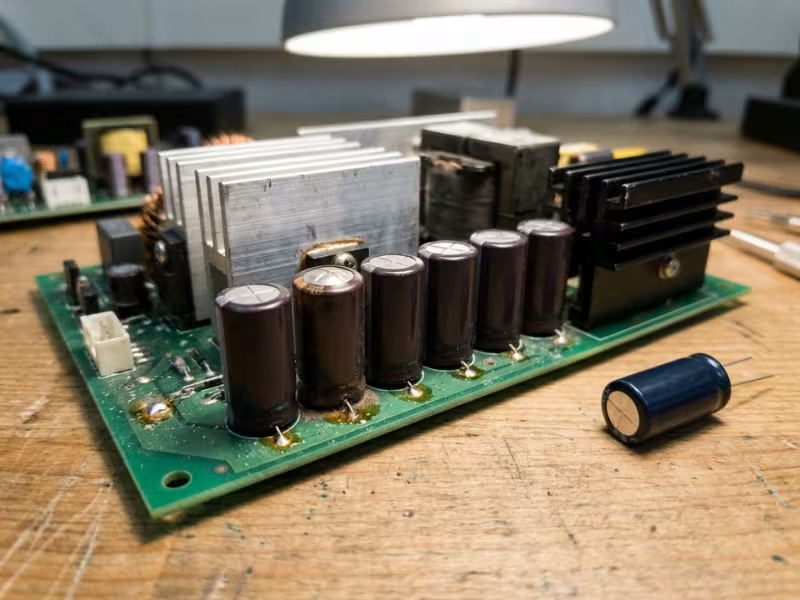
Electrolytic capacitors slowly dry out. Their capacitance drops, and their internal resistance climbs. Ripple grows, the parts run hotter, and the decline speeds up.
Fans follow a similar path. A sleeve-bearing fan may last around 30,000 hours at moderate temperatures. A ball-bearing fan often lasts 50,000 hours or more. Both lose life quickly in heat and dust. Once a fan slows, internal temperatures rise, and the capacitors age even faster.
So when I estimate real lifespan, I start with the hottest capacitor and the fan. Then I compare their rated life with the conditions where the supply will actually run.
The Fastest Way to Judge Whether a Lifespan Claim Looks Credible
You don’t need a lab to spot a weak lifespan claim. Most of the clues sit right on the datasheet. I run three quick checks in the first few minutes of every supplier review.
Start With the Conditions, Not the Headline Number
Skip past the big MTBF figure at first. Look for the footnote or the small line under it.
A credible claim states three things:
- Ambient temperature, such as 25 °C or 40 °C
- Load level, such as 75% or 100%
- Prediction standard, usually Telcordia SR-332 or MIL-HDBK-217F
Then compare those numbers with your project. Suppose the claim assumes 25 °C at 50% load, but your cabinet runs at 45 °C near full load. In that case, the figure doesn’t describe your application. Ask the supplier to restate it at your real conditions. A capable supplier can do that within a few days.
Read the Capacitor and Thermal Clues
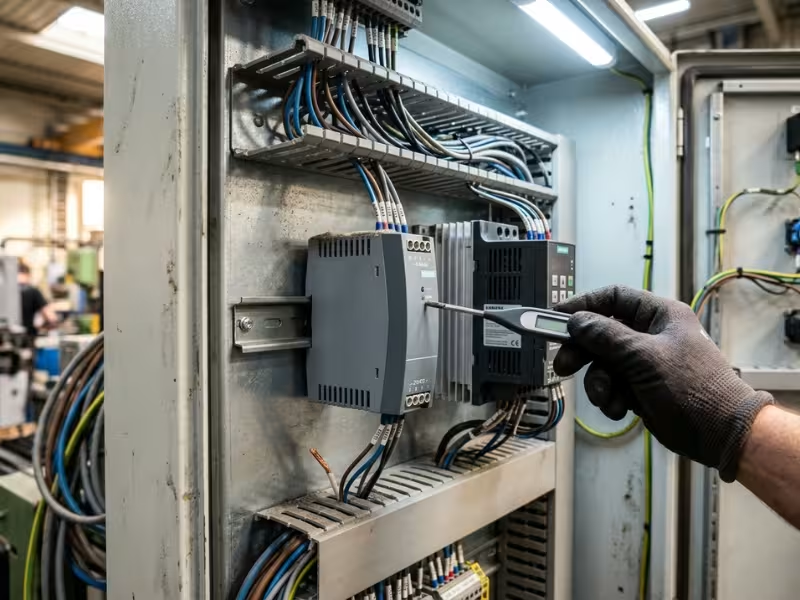
Capacitors predict real lifespan better than MTBF does. If the datasheet doesn’t list them, ask for the electrolytic capacitor grade or a partial BOM.
A 105 °C capacitor rated for 5,000 to 10,000 hours is a strong sign. An 85 °C part rated for 2,000 hours is a red flag for warm sites. With the same rated hours and the same operating temperature, a 105 °C part can last roughly four times longer.
Next, check the cooling method. Convection-cooled supplies have no fan to wear out. For fan-cooled units, ask for the fan’s rated life, its bearing type, and the temperature behind that rating.
Finally, study the derating curve. If full power holds to 50 °C or higher, the design likely has thermal margin. If derating starts at 40 °C, the inside already runs hot. Some suppliers also publish an expected service life, such as “5 years at 40 °C and 80% load.” That line usually means someone did the capacitor math.
Be Wary of Big Numbers With Little Method
Some datasheets show an impressive figure with nothing behind it. These signs make me dig deeper:
- No prediction standard named
- An MTBF above 1,000,000 hours with no stated conditions
- A one-year warranty next to a 500,000-hour claim
- The same MTBF on every model in the catalog
- No third-party test report and no field return data
If you see… | Check next… |
|---|---|
MTBF with no temperature or load | Ask for the figure at your ambient and load |
No capacitor information | Request the capacitor grade and rated hours |
Fan-cooled design | Fan rated life, bearing type, and test temperature |
Derating that starts at 40 °C | Internal hot-spot temperatures at full load |
Short warranty, huge MTBF | Field return data and units shipped |
Identical MTBF across a product line | Whether anyone calculated each model at all |
A claim that survives these checks deserves a bench test. A claim that fails two or more rarely deserves your order.
How to Verify Power Supply Lifespan in Practice
A datasheet review narrows your shortlist. Bench work tells you which supply has earned the order. You don’t need a year-long life test. Three to five samples and a few focused weeks will expose most weak designs before they reach the field.
Bench Test Under Real Heat and Load
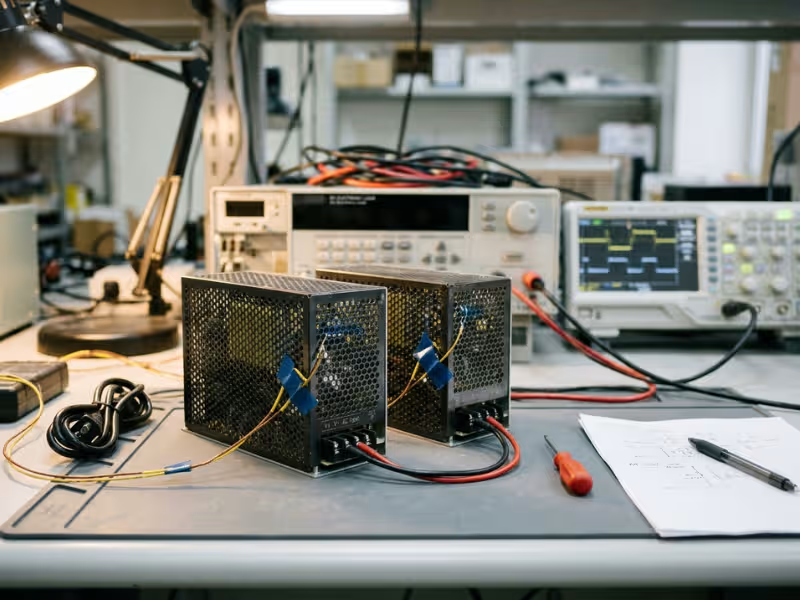
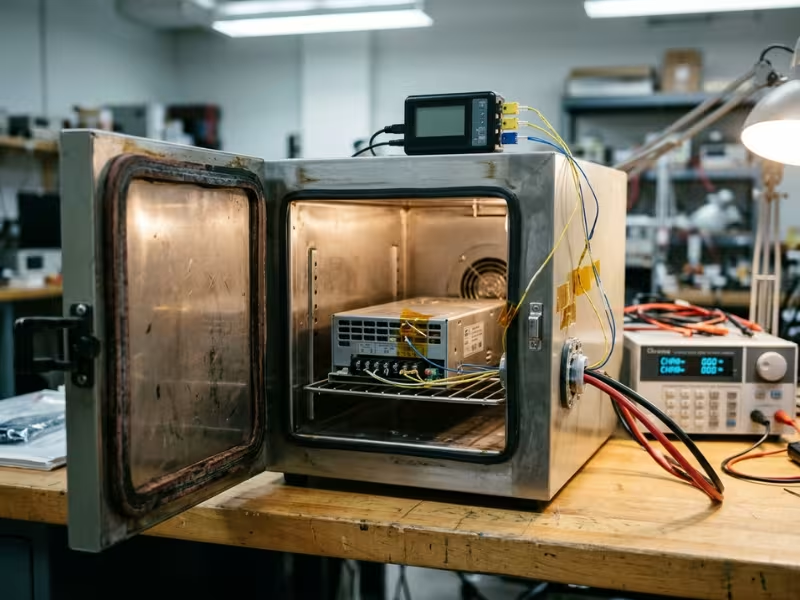
Start where the supply will actually live. Mount a sample in its real enclosure, or in a thermal chamber set to your maximum site temperature. Run it at your true peak load, not the comfortable 50% that many demos use.
Let it soak for 4 to 8 hours until temperatures stop climbing. Then tape thermocouples to the hottest parts:
- The bulk input capacitor
- The output electrolytic capacitors
- The transformer
- The output rectifier or its heatsink
The capacitor reading matters most. If the hottest output capacitor sits at 85 °C and carries a 105 °C, 2,000-hour rating, it should last only about 8,000 hours. That is less than one year of nonstop running, whatever the MTBF says. Add about 5 °C to your reading, because ripple current heats the core more than the case.
Watch Ripple, Hold-Up, and Hidden Hot Spots
Aging capacitors give off warning signs long before the output fails. Your job is to record a baseline early, then watch for drift.
Ripple: Measure output ripple with a 20 MHz bandwidth limit and a short ground spring on the probe. A long ground lead picks up noise and hides the real trend. Log the value after the heat soak, then check it again at each test interval. Steady growth means capacitor ESR is rising.
Hold-up time: Cut AC input at full load and measure how long the output stays in regulation. Many supplies spec 10 to 20 ms. As the bulk capacitor loses capacitance, hold-up shrinks. I often see hold-up drop before ripple moves at all.
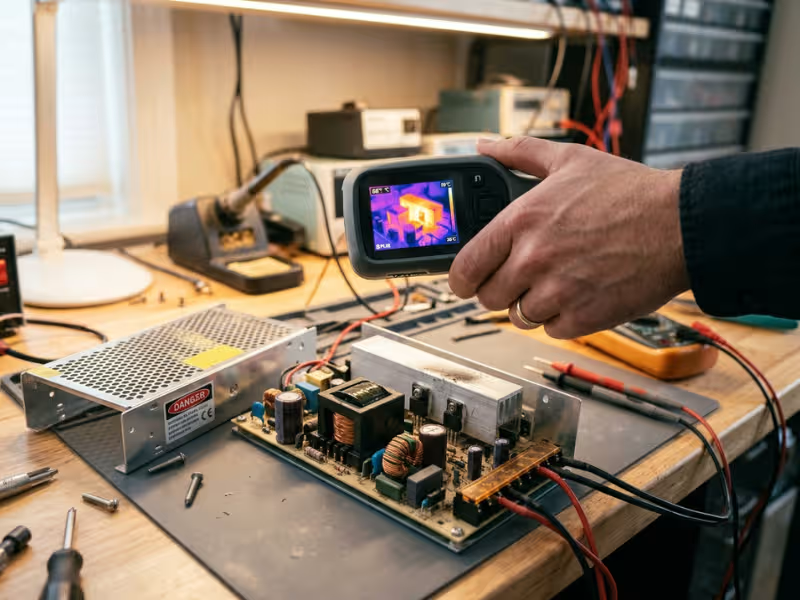
Hot spots: Do a quick thermal camera scan to catch anything your thermocouples missed. A snubber resistor or a crowded MOSFET often runs far hotter than expected. Keep the scan brief, because an open cover changes airflow.
Cycle Power and Load to Find Weak Joints
Steady heat finds weak capacitors. Cycling finds weak solder joints, tired inrush parts, and marginal start-up circuits.
Program your electronic load to step between 10% and 100% every few seconds. Separately, cycle AC power on for a few minutes and off long enough to partly cool. Run several thousand cycles. If the supply will go outdoors, add chamber cycles between about –20 °C and +60 °C.
Afterward, measure ripple, hold-up, and output voltage again. Then check the board under magnification around heavy parts. Look for cracked joints at the transformer pins, heatsink legs, and connectors. Confirm the supply still starts cleanly when cold.
Check Your Results Against Outside Evidence
Five samples can’t prove fleet reliability. They can, however, show whether the supplier’s numbers hold up.
Ask for third-party reports, such as HALT, accelerated life, or burn-in data. Request field return figures: units shipped, returns, and failure analysis results. Also ask for the supplier’s capacitor life calculation and compare it with your readings. If your capacitors run 10 °C hotter than theirs, cut their life estimate roughly in half for your project.
Check item | Why it matters | What may indicate risk |
|---|---|---|
Hottest capacitor temperature | Sets the real wear-out date | Under 3 years of calculated life at your ambient |
Output ripple trend | Tracks capacitor ESR rise | Steady growth between test intervals |
Hold-up time | Reveals bulk capacitor loss | Falling toward the spec minimum |
Thermal camera scan | Finds parts sensors missed | Any part near its rated limit |
Power and load cycling | Exposes solder and start-up weakness | Cracked joints or slow cold starts |
Supplier field data | Shows real fleet behavior | No return data, or vague failure analysis |
When bench data and supplier data agree, you can trust the claim. When they differ, believe your bench.
Choosing a Power Supply When Lifespan Evidence Is Incomplete
Most projects never get a full life test. Deadlines are tight, samples arrive late, and suppliers share only part of their data. You can still make a sound choice. I work through four questions that turn missing evidence into a risk you can manage.
Ask for Proof, Not Promises
Whether you source a standard model or a custom power adapter, a short, specific request list quickly separates capable suppliers from weak ones. I send it in one email and judge the reply as much as the answers.
Clear numbers within a few days earn trust. A reply like “our products are very reliable” earns none.
Ask for… | Why it matters | Warning sign |
|---|---|---|
MTBF restated at your ambient and load | Shows whether the figure fits your project | They can only repeat the 25 °C number |
Capacitor brand, grade, and rated hours | Capacitors usually set the wear-out date | “Industrial grade” with no rating |
Thermal report at full load | Reveals hot-spot margin | No measured component temperatures |
Field return data | Shows real fleet behavior | No units-shipped or failure counts |
Change notification policy | Protects you from silent part swaps | No written commitment |
Full warranty terms | Puts money behind the claim | Short term or temperature exclusions |
Let the Hardware Tell You What the Paperwork Doesn’t
When documents run thin, open a sample or ask for internal photos. The design often reveals more than the datasheet.
These clues lower my risk rating:
- 105 °C electrolytic capacitors rated for 5,000 hours or more
- Convection cooling, or a ball-bearing fan
- Full power held to 50 °C or higher before derating
- Capacitors placed away from heatsinks and transformers
- Conformal coating for dusty or humid sites
Size matters too. A 240 W ITE power supply driving a 150 W load runs cooler and lasts longer than a 150 W unit at full load. That extra margin often costs less than a long validation program.
Add Redundancy Where Downtime Costs More Than Hardware
Redundancy doesn’t make a supply last longer. It keeps the system running when one unit fails.
I recommend N+1 when an outage stops a production line, disables a security system, or strands a remote site that takes a day to reach. As a bonus, two supplies sharing the load each run near 50%, so both stay cooler.
Set it up properly. Use an ORing or redundancy module so a failed unit can’t pull down the shared bus. Wire the DC-OK relay to an alarm. Without that alarm, redundancy only hides the first failure until the second one takes the system down.
For a simple device that someone can swap in minutes, redundancy usually costs more than it saves.
Let Warranty and Service Plans Cover the Gap
A warranty shows what the supplier will actually pay for. A five-year warranty on an industrial supply tells me more than a 1,000,000-hour MTBF with one year of coverage.
Read the terms closely. Check whether the warranty covers your operating temperature, and whether it offers replacement or only a refund.
Then build a service plan around what you still don’t know:
- Schedule replacement at 60% to 70% of the calculated capacitor or fan life
- Keep spares on the shelf, about 5% of the installed base for critical sites
- Lock the approved parts list so the supplier can’t change capacitors without notice
When the evidence falls short, margin, monitoring, and a clear replacement plan protect you.
Common Problems That Distort MTBF Verification
Even careful teams get misled. The tests run cleanly, the report looks solid, and the field still surprises them. In my reviews, the trouble usually traces back to one of four blind spots.
Supplier methods rarely line up. Two suppliers can calculate MTBF for nearly identical hardware and land far apart. Telcordia SR-332 often produces a higher figure than MIL-HDBK-217F. Even within one standard, the inputs swing the result. One supplier picks a “ground benign” environment factor, while another picks “ground fixed.” I once compared two quotes for similar 480 W DIN-rail supplies: 410,000 hours and 1.2 million hours. After both suppliers restated their figures under MIL-HDBK-217F at 40 °C and full load, the two numbers sat within 20% of each other. Ask for the calculation method and inputs, not just the result.
Your samples may be the best units you ever see. Suppliers often hand-pick validation samples, or build them on a pilot line. Five units can’t reveal a capacitor lot change, a new solder profile, or a second-source fan. I watched one design pass validation, then show rising ripple in production units six months later. The supplier had switched to a cheaper capacitor series with the same value but half the rated hours. So pull a few units from the first production lot. Repeat the heat soak and ripple check, and compare the results with your validation baseline.
The lab treats the supply more kindly than the field. A chamber offers clean air, steady input, and perfect mounting. The field offers a cabinet next to a motor drive, a dusty intake, and a cramped gap above the unit. Sometimes a technician mounts it sideways, which blocks convection cooling. Before I trust any lab estimate, I ask for one site visit with a thermometer and a few photos. If the real cabinet runs 10 °C hotter than your chamber, cut the capacitor life estimate roughly in half.
Passing a test doesn’t mean the supply will last. A pass tells you the supply survived what you tested. It doesn’t tell you when it wears out. A 1,000-hour burn-in catches early failures, but it says almost nothing about capacitor wear-out in year four. Treat a pass as clearance to ship, not as a replacement schedule. Base replacement intervals on the calculated life of the hottest capacitor and the fan. Then adjust those intervals with field return data after the first year or two.
All four gaps share the same fix: keep measuring after you approve the supplier.
FAQ
These six questions come up in almost every supplier review I join. Here are the short answers I give engineers and buyers.
How does heat affect power supply lifespan?
Heat shortens power supply life more than any other factor, mostly through the electrolytic capacitors. Every 10 °C rise roughly halves their life. A capacitor that lasts eight years at 55 °C may last only four at 65 °C.
Room temperature can mislead you. A supply in a sealed cabinet often runs 15 °C to 20 °C hotter than the surrounding air. Measure the hottest capacitor inside the real enclosure.
Is MTBF a guaranteed number?
No. MTBF predicts a failure rate across a large group of units during their useful life. A 500,000-hour MTBF means about 17 to 18 failures per 1,000 units per year of nonstop use.
It doesn’t tell you when a single unit will wear out. Most datasheet figures also come from handbook calculations, not real field returns.
What should I look for on a power supply label or datasheet to estimate life?
The label rarely shows more than ratings and certifications. The datasheet tells you more. Check these items:
- The ambient temperature, load, and standard behind the MTBF figure
- The capacitor temperature grade and rated hours
- The cooling method, plus the fan’s rated life if it has one
- The temperature where derating starts
- Any stated service life, such as “5 years at 40 °C and 80% load”
What is the difference between MTBF and warranty coverage?
MTBF is a statistical estimate. A warranty is a financial commitment. The supplier pays only for what the warranty covers.
A five-year warranty tells me more than a 1,000,000-hour MTBF with one year of coverage. Read the terms for temperature limits and exclusions.
When should I replace a power supply that is still working?
Plan to replace it at 60% to 70% of the calculated life of its hottest capacitor or its fan. Replace it sooner if you see any of these signs:
- Ripple has grown 20% to 30% above your baseline
- Hold-up time keeps shrinking
- The fan has slowed 10% to 15% or makes a grinding noise
- Cold starts take more than one try
On critical sites, don’t wait for the first failure.
What evidence should I ask for if a supplier claims long lifespan?
Ask for proof you can check:
- MTBF restated at your ambient and load, with the method and inputs
- Capacitor brand, grade, and rated hours
- A full-load thermal report with measured component temperatures
- Field return data, including units shipped, returns, and failure analysis
- Third-party HALT or accelerated life test reports
A capable supplier sends clear numbers within a few days. A vague answer is your warning sign.
Check the Evidence Behind the MTBF Number
MTBF still earns its place on a datasheet. It helps you compare failure rates across a fleet. But it can’t tell you when your unit will wear out. Treat it as the first question, not the answer.
Real lifespan depends on where the supply runs. A 10 °C rise can halve capacitor life. Harsh load cycles, dusty intakes, and a tired fan cut years off a design that looked great on paper. A cheap capacitor swap can do the same damage without any warning.
The safest choice comes from evidence you can check. That means a heat soak in your real enclosure, a ripple trend, a hold-up reading, and field return data. Without that proof, a big headline number is only a claim.
Before you sign your next purchase order for any power supply, ask the supplier to restate the MTBF at your real temperature and load. Then put one sample on your bench and measure its hottest capacitor.