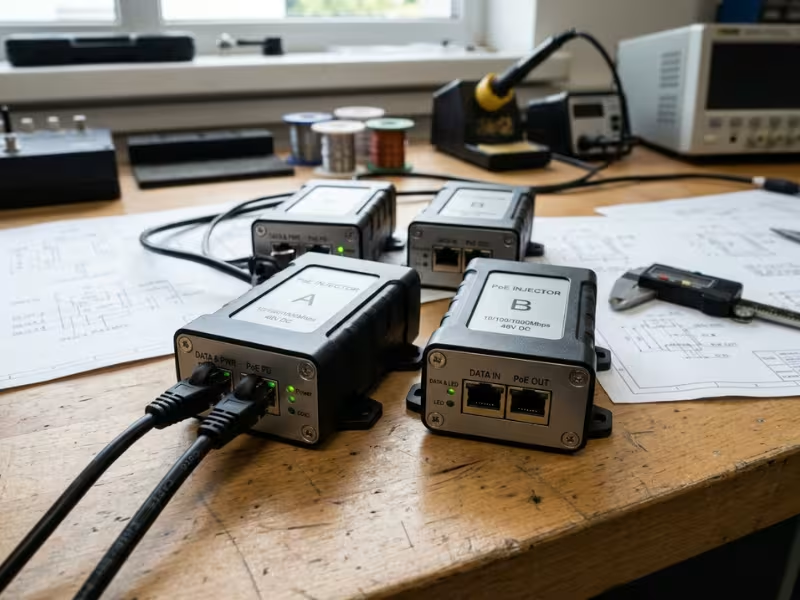
Two adapters can carry the same “48V PoE” label but behave differently. One checks for a valid powered device before it sends any current. The other puts 48V on the cable as soon as you plug it in. On a datasheet, they look almost identical. Inside your product, one boots cleanly and the other can damage an Ethernet port.
That gap between label and behavior is why choosing a PoE adapter takes more than matching a wattage number. I often see the problem show up late. A device powers up on the bench, then fails during system bring-up. A Gigabit link quietly drops to 100Mbps. An adapter shuts down inside a sealed cabinet. An EMC scan fails two weeks before launch. By then, every fix costs more time and money.
This guide explains how to choose a PoE adapter in the order engineers should use. It is written for hardware engineers, product managers, and sourcing teams selecting adapters for real equipment and volume production. You will learn how to:
- Define the six device inputs that drive every later decision
- Size voltage and wattage for peak load, cable loss, and heat
- Match the IEEE standard, PoE type, and Ethernet speed to your device
- Avoid the six selection mistakes that cause most field failures
Where it helps, examples refer to Quankang’s 24W–100W PoE adapter range.
Step 1: Start With Your Powered Device, Not the Adapter Catalog
Most selection mistakes start the same way. Someone opens a supplier catalog before they open the device datasheet.
Reverse that order. Your powered device (PD) sets the rules. The adapter has one job: meet the PD’s input range and complete its power negotiation cleanly. Without the PD numbers, any catalog choice is a guess.
Confirm these six inputs before you shortlist a model:
- Input voltage range. Read the minimum and maximum from the PD datasheet or PD controller IC, not just the nominal value. An 802.3af device, for example, must accept 37–57V.
- Peak and continuous power. Take both from your power budget, or measure them on a prototype at full load. “Typical” is not enough.
- PoE standard and class. The PD controller decides whether the device requests 802.3af, 802.3at, or 802.3bt power.
- Ethernet speed. Confirm whether the uplink is 10/100Mbps, Gigabit, or 2.5G/5G/10G.
- Space and connectors. Note enclosure limits, RJ45 position, AC inlet type, and mounting method from your mechanical drawings.
- Target markets. Your sales regions decide plugs and certifications.
Peak power trips up even experienced teams. One camera team I worked with picked a 30W adapter for a “25W” device. It looked like plenty of margin. Then units started rebooting every night.
The 25W figure was the typical load. When the IR illuminators and heater switched on together, the camera pulled 34W. That exceeded both the adapter’s rating and the 802.3at power class it was built around. They had a datasheet number. They didn’t have the right one.
Takeaway: If you can’t fill in all six inputs, you aren’t ready to choose a model.
Step 2: Choose the Right Output Voltage: 12V, 24V, 48V PoE Adapter or 54V?
“Output voltage” can mean two things. First, it’s the voltage the adapter puts on the Ethernet line. The second is the DC rail on your device’s board after a splitter or onboard PD converter steps it down to 12V, 5V, or 3.3V. For adapter selection, the spec that counts is the PD’s input range at the RJ45 port, not the board rail.
12V and 24V: Passive PoE and Short-Run Designs
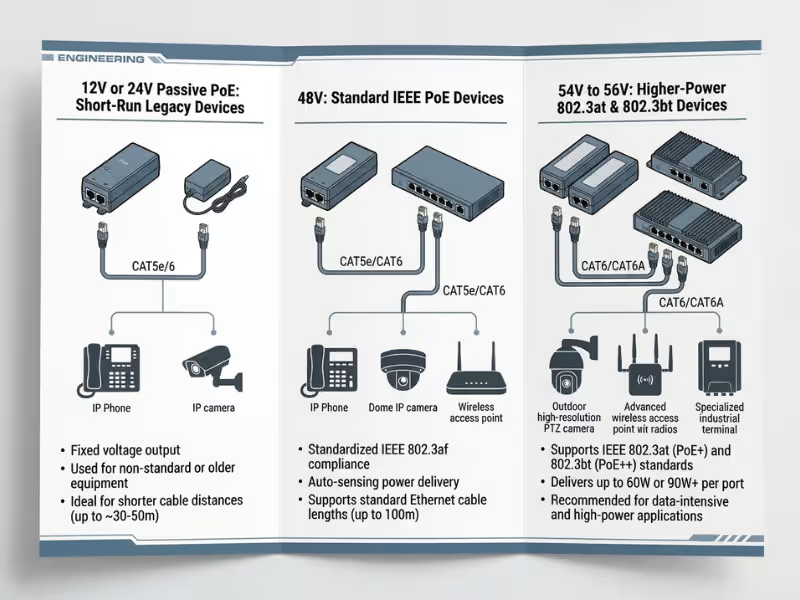
You still find 12V and 24V line voltage in legacy outdoor radios, older access points, and closed systems where one vendor controls both ends. Physics limits them. At the same power, 12V needs four times the current of 48V, and cable loss rises with the square of current. That makes 12V practical only on short runs, often under 20–30m depending on load and cable gauge. Most of these designs are also passive (see Step 5). Quankang offers 12V and 24V outputs as custom configurations for closed-system projects.
48V: The Common Baseline for IEEE PoE
A 48V PoE adapter sits inside the 802.3af source range of 44–57V. It suits IP phones, fixed cameras, sensors, and other standard PDs under 13W at the device. For 802.3at, be careful: the standard requires 50–57V at the source. Some adapters labeled “48V” actually output higher, while others sit right at 48V. Check the real output tolerance before you count on a 48V unit for PoE+.
54V–56V: Headroom for 802.3at and 802.3bt
Higher power means more current, and more current means more voltage drop. Take a worst-case 802.3at link carrying 600mA over 100m of Cat5e. The channel loop resistance can reach 12.5Ω, which costs about 7.5V. Start at 50V, and the PD sees roughly 42.5V, exactly its minimum. Start at 54V to keep a safe buffer.
That is why Quankang’s higher-power platforms use this band: the PoE54DZ at 54V/1.0A, the PoE90 at 56V/1.61A, and the PoE100-54A at 54V/1.86A.
Line Voltage | Typical Standard | Typical Devices | Cable Run |
|---|---|---|---|
12V / 24V | Passive | Legacy radios, closed systems | Short runs only |
48V | 802.3af | IP phones, fixed cameras, sensors | Up to 100m for af |
54V–56V | 802.3at / bt | APs, PTZ cameras, industrial HMIs | Up to 100m at high power |
Takeaway: Choose based on the PD’s input range and your cable length, not the number printed on the label.
Step 3: Calculate PoE Adapter Wattage and Power Margin
Wattage looks like the easiest spec on the list. In practice, it causes more field resets than almost anything else.
Start with one fact: the adapter’s rating describes power at the source (PSE), not at your device. Under 802.3af, the source delivers 15.4W, but the device can count on only 12.95W. Under 802.3at, the source delivers 30W, and the device can count on 25.5W. On a worst-case 100m run, roughly 15–20% of the power never reaches the load. On short runs, the loss is much smaller.
Peak Load Matters More Than Average Load
Every device type has components that spike:
- IP cameras: IR LEDs switch on at dusk; heaters kick in on cold starts
- PTZ cameras: Motors draw hard bursts during pan, tilt, and zoom
- Access points: Radios burst under heavy client traffic; USB ports add load
- Industrial terminals: Backlights and attached sensors add load
Measure these events on a real prototype. Don’t estimate them.
A Worked Example
Say your device draws 40W continuous and 48W at peak, measured at the device, on a 100m run.
- Add worst-case cable loss. 48W ÷ 0.85 ≈ 56W needed at the source.
- Add 25% headroom for continuous duty. 56W × 1.25 ≈ 70W.
- Compare options. A 54W 802.3at adapter fails twice: it lacks the power, and 802.3at can’t deliver more than 30W per port anyway. An 802.3bt Type 3 budget of 60W is too tight. A 90W 802.3bt platform like the PoE90 fits with margin.
The example shows why you can’t choose wattage and standard separately. Once the device’s peak load exceeds 25.5W, you are in 802.3bt territory.
Heat Shrinks Your Real Wattage
Nameplate ratings usually assume open air at around 25°C. Many adapters start derating above 40°C or 50°C ambient. In a sealed enclosure, a “60W” unit may safely deliver only 45W. Ask your supplier for the derating curve, then read it at your actual installation temperature.
When Bigger Stops Helping
A 90W adapter on a 15W phone costs more, takes more space, and runs less efficiently at light load. That means more wasted heat and a harder time meeting efficiency rules. Pick the smallest platform that clears your peak with 20–30% margin, and push higher only for sealed or hot enclosures.
Takeaway: Size from the device’s peak load, add cable loss, then add 20–30% headroom. Stop there.
Need help running these numbers? Compare Quankang PoE adapter models or send us your power budget for a recommendation.
Step 4: 802.3af vs 802.3at vs 802.3bt: Which PoE Standard Do You Need?
Many buyers treat the IEEE standard as a wattage label. It is more than that. The standard defines the detection and classification handshake. The device announces its class, and a compliant adapter applies power only after a valid signature. If the two sides speak different versions, the device may never get the power it asks for.
Standard | Power at Source | Power at Device | Pairs Used | Typical Devices |
|---|---|---|---|---|
802.3af (PoE) | 15.4W | 12.95W | 2 | IP phones, fixed cameras, sensors |
802.3at (PoE+) | 30W | 25.5W | 2 | Dual-band APs, IR dome cameras, video phones |
802.3bt Type 3 | 60W | 51W | 4 | Wi-Fi 6/6E APs, PTZ cameras, thin clients |
802.3bt Type 4 | 90W | 71.3W | 4 | Wi-Fi 7 APs, heated outdoor PTZ, industrial HMIs |
802.3af (PoE): Low-Power Devices
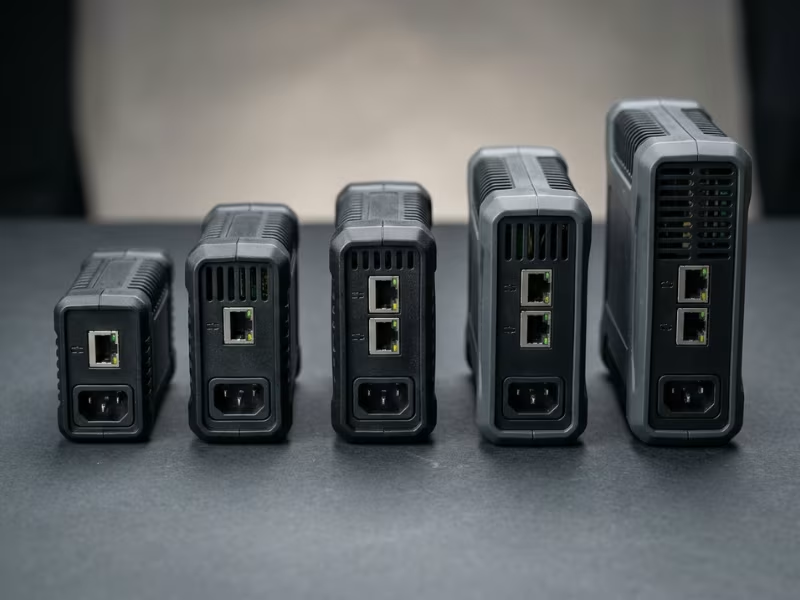
802.3af covers simple, steady loads such as desk phones, indoor fixed cameras, and access control readers. It’s the most widely supported standard, but it leaves little room for future feature upgrades. Quanta’s PoE24 covers compact AF/AT devices at 10/100Mbps.
802.3at (PoE+): The Mid-Range Workhorse
PoE+ handles most dual-band APs, IR cameras, and video phones, delivering 13W to 25W at the device. It’s the safe default for general network equipment, as long as your measured peak fits under 25.5W. The PoE35 and PoE54DZ cover 802.3af/at devices with Gigabit pass-through.
802.3bt (PoE++): Type 3 and Type 4 High-Power Loads
802.3bt carries power on all four pairs. Type 3 suits multi-radio APs and PTZ cameras. Type 4 handles outdoor PTZ units with heaters, Wi-Fi 7 APs, and industrial HMIs. The PoE90 supports 802.3af/at/bt, and the PoE100-54A supports 802.3at/bt with 100W output. If your device peaks above 25W, start your search here.
What Happens When Standards Don’t Match
Backward compatibility works in one direction. An 802.3bt adapter can power af and at devices, because the handshake negotiates the lower class. The reverse fails. An af adapter on an at or bt device either refuses to power it or lets it boot in a reduced-power mode. An AP might shut off a radio. A PTZ camera might disable its heater. These failures often look like random bugs, but most trace back to a class mismatch.
Also watch for “PoE++” products from before 802.3bt was ratified in 2018. Some proprietary high-power schemes skip the standard handshake. Ask the supplier to confirm the exact standard, Type, and Class in writing.
Takeaway: Match the standard your device negotiates. Going higher is safe. Going lower is not.
Step 5: Active vs Passive PoE: Why the Difference Matters
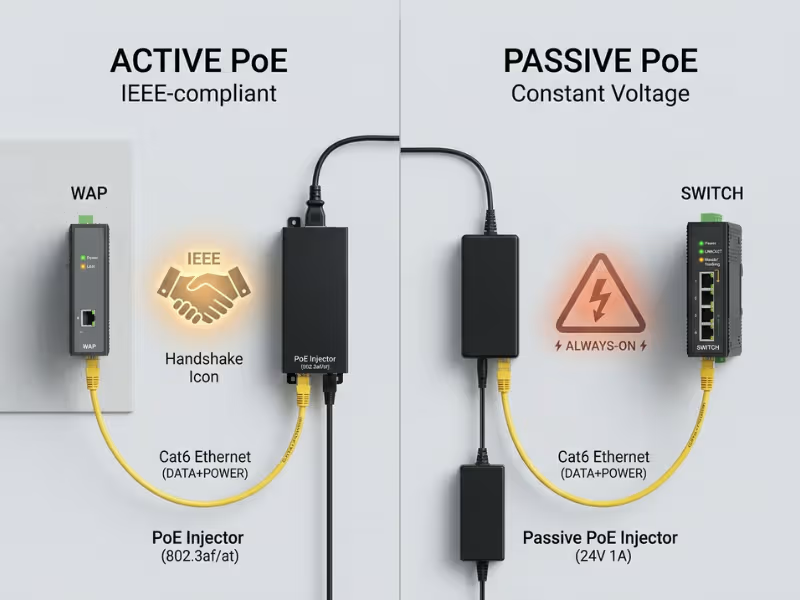
The difference comes down to one question: does the adapter check the device before it sends power?
Active PoE follows IEEE 802.3af/at/bt. The adapter probes the line for a valid PD signature, a ~25 kω resistance. Only then does it classify the load and switch on full power. Plug in a laptop or a non-PoE switch, and nothing happens.
Passive PoE skips that step. It applies a fixed voltage, usually 24V or 48V, to a set pair of wires as soon as you connect it.
Factor | Active (IEEE) PoE | Passive PoE |
|---|---|---|
Detection | Signature check first | None |
Voltage | Applied after handshake | Always on |
Safe with non-PoE gear | Yes | No |
Typical use | Enterprise and OEM products | Closed systems, legacy radios |
Cost | Higher | Lower |
How Passive PoE Damages Equipment
Many non-PoE devices tie their spare pairs to termination resistors. Constant 48V across those parts can burn them out, and sometimes the Ethernet PHY or magnetics fail with them. A pinout mismatch can cause similar damage: a passive adapter that feeds the wrong pairs or reverses polarity can destroy a port built for a different layout.
The labeling problem makes this worse. A technician grabs a spare adapter from a drawer. The label says “48V PoE,” and nothing says passive. Many online listings omit that detail. If a datasheet never mentions detection, classification, or an IEEE standard, treat the adapter as passive until the supplier confirms otherwise.
When Passive PoE Still Makes Sense
Passive PoE is acceptable in a closed system where you control both the adapter and the device, and no third-party equipment will join the link. A radio kit shipped with its own matched adapter is a typical example. There, passive designs can cut BOM cost.
Takeaway: If the device expects 802.3af, 802.3at, or 802.3bt, never use passive PoE.
Step 6: Confirm Gigabit PoE Adapter and Multi-Gig Compatibility
An adapter can power your device perfectly and still slow down its network link. Data speed is the spec that fails quietly.
The issue is how power and data share the cable. At 10/100Mbps, data uses only two pairs (1-2 and 3-6). Power can ride on the spare pairs (4-5 and 7-8), known as Mode B. At Gigabit and above, data uses all four pairs. Power must travel on the data pairs through center-tapped transformers, known as phantom power.
The “Link Works but It’s Slow” Trap
Many low-cost adapters use a spare-pair design and wire only two pairs for data. The device powers up, and the link LED lights, but the port negotiates at 100Mbps. Teams blame the switch, the firmware, or the cable. Check the adapter first.
A datasheet that lists “10/100Mbps,” or shows data on pins 1, 2, 3, and 6 only, caps your link. Look for an explicit “10/100/1000Mbps” or higher rating. On a prototype, open the switch port status and confirm the negotiated speed.
Multi-Gig Needs More Than a Gigabit Rating
Wi-Fi 6, 6E, and 7 access points often use 2.5G or 5G uplinks, and some flagships use 10G. The adapter’s magnetics and PCB layout must support that speed, or you’ll get errors, retries, and lower throughput. Match the cable too:
- 2.5G: Cat5e to 100m
- 5G: Cat5e in most installs, Cat6 for more margin
- 10G: Cat6A to 100m, or Cat6 to about 55m
Quankang’s PoE90 and PoE100-54A pass 10Mbps–10Gbps. The PoE35 and PoE54DZ cover up to Gigabit. The 100m channel limit applies at every speed. The adapter powers the link, but it doesn’t extend it.
Takeaway: Confirm the adapter’s rated data speed matches your device’s uplink, then verify the negotiated speed on real hardware.
Step 7: Check Connectors, Pinout and Mechanical Fit
An adapter can pass every electrical spec and still fail at integration. The problem usually sits at the pin definition, the connector, or the mounting.
Pinout and Polarity: The Silent “No Power” Fault
Mode A powers pairs 1-2 and 3-6. Mode B powers pairs 4-5 and 7-8. IEEE-compliant devices must accept both modes in either polarity. Many passive and custom devices accept only one. Feed a Mode A-only device from a Mode B adapter, and you get no LED, no error code, nothing. Compare both pin tables before you order samples.
Check the RJ45 layout too. Clear “Data In” and “PoE Out” labels prevent swapped connections in the field. Use shielded jacks for outdoor, industrial, or STP installs that need a ground path.
The AC Side for Multi-Market Products
A detachable IEC inlet lets you keep one adapter SKU and ship regional cords. C8 suits two-wire Class II designs, while C6 and C14 add an earth connection. A fixed plug (US, EU, UK, AU) costs less but locks each SKU to one region.
Form Factor and Mounting
Desktop units suit offices. Wall-mount units suit retrofits. DIN-rail units fit control cabinets. Embedded modules go inside your own enclosure. Before sampling, check:
- Overall dimensions and clearance
- Mounting holes or DIN clip type
- DC and Ethernet cable lengths
- Power and link LEDs a field technician can see
One team’s wall-mount adapter worked well electrically. In the field, its 58mm-wide body blocked the next outlet and kept the cabinet door from closing. Nobody had requested a drawing.
Takeaway: Lock pinout, connector type, and mounting before sampling, not after.
Step 8: Verify Thermal, Protection and Certification Requirements
An adapter that runs fine on your desk can fail inside a sealed box on a hot rooftop. It can also pass every bench test and then sink your product in the certification lab.
Test the Adapter Where It Will Actually Live
Trapped air in cabinets, ceilings, and outdoor housings often runs 15–20°C above room temperature. Test the adapter at full device load inside the real enclosure at the maximum expected ambient for several hours. Watch for output drops, resets, and hot spots on the case.
Protection Features and Surge Ratings
Ask which protections are standard and which are optional, and get the answer in writing. All Quankang PoE adapters include short-circuit, overcurrent, and overvoltage protection standard. Over-temperature protection is included on selected models such as the PoE100-54A.
For outdoor or industrial runs, surge immunity matters most. Ask for kV ratings under IEC 61000-4-5, with both differential-mode and common-mode figures. A single headline number can hide a weak spot. For example, the PoE100-54A is rated for a 6kV surge and accepts 90–290 VAC input for sites with unstable grid voltage.
Check isolation too. Confirm the Ethernet port meets the 1500Vrms isolation required by IEEE 802.3, and ask for the input-to-output hipot test voltage.
Certifications for Your Target Markets
Map certifications to your sales regions early:
- Safety: IEC/EN/UL 62368-1, with a CB report for reuse across countries
- EU and US: CE and FCC
- Regional marks: CCC (China), PSE (Japan), KC (Korea)
Also confirm which efficiency regulations apply to your configuration and market. A pre-certified adapter shortens your approval process because the power path already has reports on file. Selected Quankang models carry CE, CB, UL/cUL, CCC, PSE, KC, and FCC, depending on model.
EMC Starts With the Adapter
The adapter adds its own switching noise. An adapter that passes EMC on its own can still push your finished product over the radiated emissions limit. Pre-scan the adapter with your device before you freeze the enclosure, while fixes are still cheap.
Takeaway: Ask for derating curves, surge ratings, and certificates for your exact target markets before you approve a sample.
Step 9: How to Choose a PoE Adapter by Application
Treat this section as a shortcut once you’ve worked through Steps 1–8, not a substitute. Each profile lists typical needs and the factor teams most often miss.

PoE Adapters for IP Cameras and Surveillance
Fixed indoor cameras usually draw 4–12W on 802.3af. IR and outdoor models often need 802.3at. PTZ and heated outdoor units can climb to 30–60W and need 802.3bt at 54V. Most missed: IR and heaters switching on together on a cold night, plus surge on long outdoor runs. Start with the PoE24 for fixed units and the PoE54DZ for IR and outdoor models within 802.3at limits.
PoE Adapters for Wireless Access Points
Wi-Fi 6E and Wi-Fi 7 APs with three or four radios often exceed 30W and need 2.5G–10G uplinks. Underpowered APs shut down a radio or USB port. Most missed: multi-gig pass-through. Start with the PoE54DZ for Gigabit 802.3at APs and the PoE90 for multi-gig 802.3bt units.
PoE Adapters for VoIP Phones and Communication Terminals
Basic desk phones draw 3–7W on 802.3af. Video phones, color touchscreens, and sidecar modules can exceed 13W and require 802.3at. Most need Gigabit pass-through because they share a port with a desktop PC. Most missed: the fully loaded unit, not the bare handset. Start with the PoE35 or PoE54DZ.
PoE Adapters for Industrial and IoT Equipment
HMIs, gateways, and control terminals run 24/7 in enclosed cabinets. They need wide AC input, surge immunity, over-temperature protection, and real thermal margin. Most missed: cabinet ambient temperature, which can reach 50–60°C near drives or transformers. Start with the PoE90 or PoE100-54A.
Application | Power Range | Standard | Data Speed | Key Risk |
|---|---|---|---|---|
IP cameras | 4W–60W | af / at / bt | 100M–1G | Night peak load, surge |
Wireless APs | 15W–70W | at / bt | 1G–10G | Multi-gig pass-through |
VoIP phones | 3W–25W | af / at | 1G | Add-on module load |
Industrial / IoT | 10W–90W | at / bt | 100M–10G | Cabinet temperature |
Takeaway: Use the profile to narrow the field, then confirm every figure against your device datasheet.
See full specs for each platform on our PoE adapter product page.
Step 10: Avoid Common PoE Adapter Selection Mistakes, and Know When to Go Custom
Every mistake below comes from real integration projects I’ve reviewed. None came from bad hardware. Each came from a question nobody asked during selection.
- Sizing to typical load. Teams buy an adapter that barely covers the “typical” figure. Then IR LEDs, heaters, or motors spike the draw, and devices reset in the field. Fix: size from the device’s measured peak, plus cable loss and a 20–30% margin.
- Assuming “48V PoE” means IEEE-compliant. The label indicates voltage, not behavior. A passive unit can burn out a non-PoE port or fail the handshake. Fix: require the exact standard, Type, and Class in writing.
- Ignoring the 100Mbps cap. A spare-pair adapter powers the device perfectly, then holds the link at Fast Ethernet. Users complain about choppy video, and nobody suspects the power supply. Fix: require a 10/100/1000Mbps or multi-gig rating, then check the negotiated speed on the switch.
- Testing thermals in open air only. The adapter runs cool on a 25°C bench. Inside a sealed 55°C cabinet, it derates or shuts down. Fix: test at full load, in the real enclosure, at maximum ambient.
- Choosing the adapter after EMC and enclosure design are frozen. When the system fails radiated emissions, the fix means new filtering, a new layout, or new tooling. Fix: include the adapter in early EMC pre-scans.
- Approving a sample without locking the spec. A few batches into production, a component swap shifts output ripple or connector dimensions. Fix: freeze electrical values, critical parts, enclosure, and connector at approval, and require batch testing against that baseline.
When a Standard PoE Adapter Isn’t Enough
Go custom when your device needs an unusual voltage or current, a tight enclosure, a special connector or pinout, a specific set of regional certifications, or volume high enough to justify tooling. Quankang develops ODM PoE adapters with 12V to 56V output and 24W to 100W power. We can also tailor the 802.3af/at/bt design, RJ45 layout, housing, and certification scope.
To get an accurate quote quickly, send:
- Device input voltage range, plus peak and continuous power
- PoE standard, Type, and Class
- Ethernet speed
- Connector, pinout, and size limits or a mechanical drawing
- Target markets and certifications
- Operating temperature and enclosure type
- Estimated annual volume and timeline
Takeaway: Most PoE failures are selection failures. Catch them on paper, and your prototypes will confirm the design instead of exposing its flaws.
Request a custom PoE adapter quote and our engineers will reply with a spec proposal and sample plan.
PoE Adapter Selection FAQ
Can I use a higher-wattage PoE adapter than my device needs?
Yes, as long as the voltage and PoE standard match. An IEEE-compliant adapter delivers only the power the device requests during classification, so extra capacity sits unused as headroom. Keep it reasonable: a 90W unit on a 10W phone costs more, takes more space, and runs less efficiently at light load. Aim for 20–30% above peak load.
Why does my PoE device not power on even though the voltage is correct?
Usually a handshake or wiring problem blocks the power. Check, in order, the Mode A/B pinout, active vs. passive behavior, the device’s requested class, and the cable. A cable with only four wired conductors can block spare-pair power. Compare both pin tables before you assume the device or adapter is faulty.
Is a 48V PoE adapter compatible with an 802.3at device?
Only if the adapter is 802.3at-compliant and its output stays within the 50–57V source range. A nominal 48V unit can drop to near its 42.5V minimum after cable loss, and an 802.3af-only adapter may not power it fully. For reliable PoE+, choose a 54V adapter and confirm compliance on the datasheet.
What’s the difference between a PoE adapter and a PoE injector?
The terms often overlap, and many single-port injectors are sold as PoE adapters. In OEM sourcing, “PoE adapter” usually means a power supply specified or customized for a particular device’s voltage, wattage, and mechanics. Some sellers also call PoE splitters “adapters,” but splitters do the opposite job. Confirm whether the unit sources power or splits it.
Does a PoE adapter support Gigabit Ethernet?
Only if it’s rated for it. Gigabit uses all four pairs for data, so the adapter must carry power on the data pairs. Look for “10/100/1000Mbps” on the datasheet and use at least Cat5e. Multi-gig access points need a 2.5G, 5G, or 10G rating. Quankang’s PoE90 and PoE100-54A support up to 10Gbps.
How far can a PoE adapter deliver power over Ethernet cable?
Up to 100 meters, including patch cords: a 90m permanent link plus 10m of patch cables. Longer cables also reduce the power your device receives. For distances beyond 100m, use a PoE extender or a remote PoE switch. On passive 12V or 24V systems, the practical limit is often under 30m because of voltage drop.
Can passive PoE damage a non-PoE device?
Yes. Passive PoE applies full voltage without detection, which can burn out termination resistors, magnetics, or the Ethernet PHY. To check an unlabeled adapter, measure its output pins with no load attached. An active adapter shows almost no voltage. A passive one shows its full rated output immediately.
What should I send a manufacturer for a custom PoE adapter quote?
Send your device input range, peak and continuous power, PoE standard and class, Ethernet speed, connector and pinout, size limits, operating temperature, target certifications, and annual volume. Include your device datasheet and power budget, and, if possible, ship a prototype so the supplier can test interoperability and thermals. Complete inputs mean fewer sample rounds.
Get the Right PoE Adapter for Your Device
Start from your device’s six inputs. Size for the device’s peak power, plus cable loss and margin. Match the IEEE standard, active PoE behavior, and data speed. Then lock pinout, mounting, thermal performance, and certifications before sampling. Follow that order, and you’ll avoid the mistakes behind most PoE failures in the field.
Quankang supplies PoE adapters from 24W to 100W, with 802.3af/at/bt support, Gigabit-to-10Gbps pass-through, and OEM/ODM customization for voltage, connectors, housing, and certifications. Browse our PoE adapter models, PoE24, PoE35, PoE54DZ, PoE90, and PoE100-54A, or send us your device requirements for an engineering recommendation.