When a POE adapter (POE injector) stops working or fails to power a device, the issue is often not the adapter itself—but compatibility, cabling, or configuration details that are easy to overlook.

1. POE Adapter Has Power, but the Device Does Not Turn On
Possible causes
The powered device (PD) does not support POE
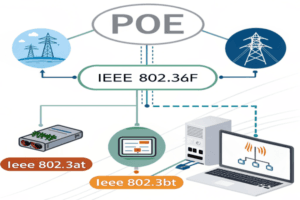
POE standard mismatch (af / at / bt)
Insufficient output power
How to fix it
Confirm the device explicitly supports POE input
Check the required POE standard and wattage
Compare device power requirement vs adapter maximum output
Tip: Many IP cameras and APs require 802.3at or bt, not basic 802.3af.
2. Using Passive POE Instead of Active POE
Why this happens
Passive POE adapters output a fixed voltage without detection or negotiation. If the voltage does not match the device, the device may not power on—or may shut down for protection.
How to fix it
Verify whether the adapter is active (IEEE-compliant) or passive
Avoid passive POE unless the device explicitly requires it
Use IEEE 802.3af / at / bt adapters for mixed-device environments
In troubleshooting cases, passive POE is one of the most common root causes.
3. Ethernet Cable Issues (Length, Quality, or Type)
Common cable-related problems
Cable length exceeds 100 meters
Low-quality or damaged Ethernet cable
Using CCA (copper-clad aluminum) instead of pure copper
How to fix it
Keep cable length within Ethernet standards
Use Cat5e or Cat6 pure copper cables
Replace suspect cables during testing
POE is more sensitive to cable quality than data-only Ethernet.
4. Incorrect Port Connection on the POE Adapter
Typical mistake
Many POE adapters have two ports:
LAN / Data IN
POE / Data + Power OUT
Reversing these connections will prevent power delivery.
How to fix it
Confirm switch or router connects to LAN / Data IN
Confirm the powered device connects to POE OUT
Check port labeling carefully
5. Device Requires Higher Power Than the Adapter Can Provide
Why it matters
If a device draws more power than the adapter can supply, the POE adapter may:
Fail to start the device
Cycle on and off
Shut down under protection mode
How to fix it
Check device maximum power consumption (W)
Select an adapter with sufficient power margin
Consider 802.3bt for high-power devices
6. Environmental Factors: Temperature and Surge Events
Possible environmental causes
Operating outside rated temperature range
Outdoor installation without surge protection
Lightning or power fluctuation events
How to fix it
Verify adapter operating temperature specifications
Use surge-protected POE adapters where required
Install adapters in controlled or protected enclosures
7. Faulty Device or POE Adapter
How to identify
Swap the powered device with a known working unit
Test the adapter with a different POE-compatible device
Check indicator LEDs if available
Next steps
If the issue follows the adapter or the device consistently, replacement or further testing may be required.
Quick POE Troubleshooting Checklist
Before replacing equipment, confirm:
Device supports POE input
POE standard matches device requirement
Adapter output power is sufficient
Active vs passive POE is correct
Ethernet cable quality and length are acceptable
Ports are connected correctly
Related POE Reference Articles
POE Adapter: Complete Buying Guide for IP Cameras, APs & IoT Devices
POE Adapter vs POE Injector: What’s the Difference?
POE Adapter vs POE Switch: Which One Should You Choose?
Passive POE vs Active POE: Why IEEE Standard Matters
Final Thoughts
Most POE adapter failures are system-level issues, not hardware defects. By checking standards, power requirements, cabling, and installation details, the majority of problems can be resolved without replacing equipment.
A structured troubleshooting approach helps ensure stable POE deployment and long-term reliability, especially in professional IP surveillance, networking, and industrial applications.