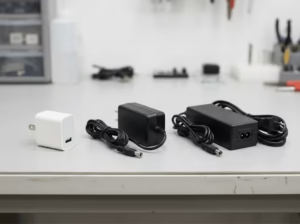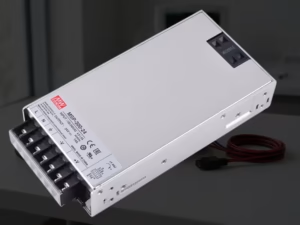

Start with Device Requirements
When selecting a DC 5V power supply or charger, the first step is to understand your device’s specific power needs. Matching the correct output voltage and current is critical for safe and effective operation.
Voltage Matching: Your adapter must output exactly 5V DC to match your device’s input requirement. A mismatch in voltage can lead to device malfunction or damage. Always check the device’s label or manual for its required input voltage.
Current (Amperage): The current rating, measured in amperes (A), indicates the maximum current the adapter can supply. Your device will draw only what it needs, but the adapter must supply at least that amount. For example, a device requiring 2A should use an adapter rated 2A or higher.
Connector Type: Verify the physical connector your device accepts — common options include USB-A and USB-C. USB-A typically delivers standard 5V output without negotiation, while USB-C may require protocol support (such as PD) to ensure proper power delivery.
Understanding these baseline requirements ensures the adapter you choose is fundamentally compatible with your device.
Assessing Power Ratings & Efficiency
Output Stability, Amperage, and Ripple
Beyond basic voltage and current ratings, pay attention to how stable the adapter’s output is under load:
Stable Output: A quality DC 5V adapter maintains stable voltage even when the load changes. Voltage deviation beyond ±5% can cause performance issues or device resets.
Amperage Capacity: Choose an adapter with an amperage rating that meets or exceeds your device’s needs. Higher amperage doesn’t force more current into the device — it simply ensures the adapter can support peak demand without overheating.
Ripple and Noise: Lower ripple and noise mean cleaner power and less interference. Excessive ripple can affect sensitive electronics like microcontrollers or audio circuits. High-quality supplies typically have low ripple specs.
Efficiency matters too: more efficient adapters generate less heat and can improve both reliability and energy usage.
Safety Certifications & Standards
Safety certification ensures the adapter has passed standardized testing for reliability and protection. Look for the following marks:
UL (Underwriters Laboratories): Common in North America, indicates electrical safety compliance.
CE (Conformité Européenne): Required for products sold in the EU, covering safety and health compliance.
FCC (Federal Communications Commission): Ensures electromagnetic compatibility in U.S. markets.
RoHS (Restriction of Hazardous Substances): Confirms compliance with environmental and hazardous material limits.
Certified adapters are tested for safety features like overcurrent protection, overvoltage protection, and thermal shutdown — all essential for protecting both your devices and users.
Connector & Port Considerations
Single vs Multi-Port Chargers
Single-Port Chargers: Best for powering or charging one device at a time. They are simpler and often less expensive.
Multi-Port Chargers: Can power multiple devices simultaneously but require careful attention to per-port and total output current ratings. Ensure the adapter can deliver adequate amperage for each device connected at the same time.
Travel Chargers (Region Plugs)
If you plan to use your charger internationally, choose models that support wide AC input (100–240V AC) and include interchangeable plug options or adapters for different regions (US, EU, UK, AU).
Real-World Scenarios & Tips
Home, Office, Travel
Home/Office: A multi-port charger with both USB-A and USB-C outputs can efficiently power phones, tablets, IoT devices, and other gadgets from a single outlet.
Travel: Compact chargers with broad voltage compatibility and plug adapters ensure you can safely charge devices abroad.
Charging Multiple Devices
If your use case involves charging multiple devices at once:
Verify that the total amperage is sufficient for all connected devices. Splitting a charger’s output across devices can reduce available current per port.
Consider intelligent current distribution features found in higher-end chargers, which allocate output dynamically based on device demand.
Conclusion
Here’s a practical checklist to guide your purchasing decision:
Match Voltage: Ensure the adapter’s output is exactly 5V DC.
Check Current Rating: Choose equal or greater amperage than your device needs (e.g., 2A for a device requiring 2A).
Verify Connector Type: Confirm USB-A or USB-C compatibility with your device.
Assess Output Quality: Look for stable output, low ripple, and good efficiency ratings.
Look for Certifications: UL, CE, FCC, and RoHS marks are strong indicators of safety and compliance.
Consider Build & Portarity: Choose robust construction and, if needed, travel-friendly plug options.
By following this guide, you can confidently choose a DC 5V power supply or charger that meets your device’s requirements, ensures safety, and performs reliably across all your use scenarios.